








The new account type blocks access to features like status updates, chat lock, view-once messages, location sharing, and more for users under 13.
If you’re worried about letting your child use WhatsApp, the platform’s new parent-managed accounts may help ease some concerns.
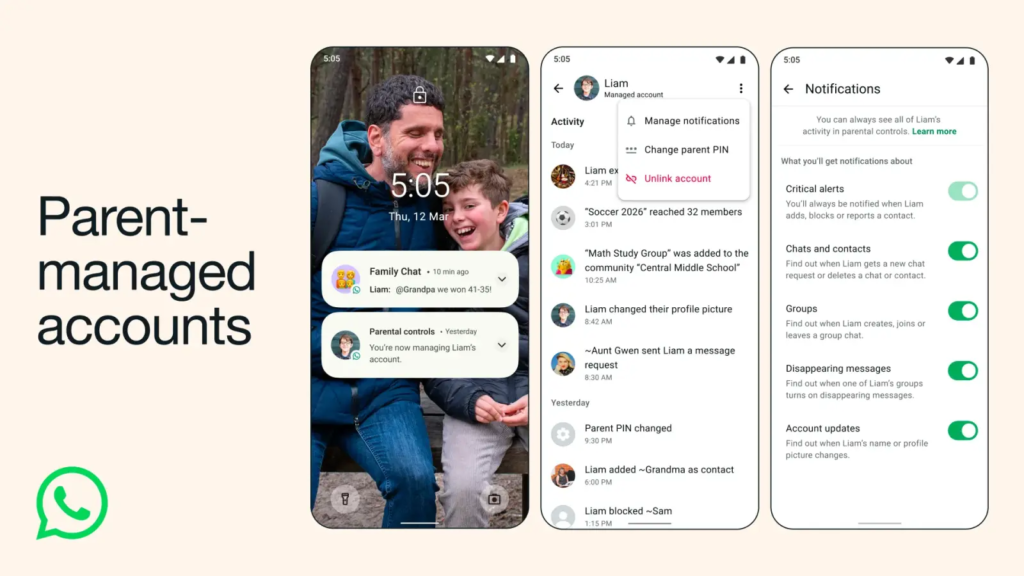
WhatsApp’s parent-managed accounts, announced Tuesday, allow parents to set up a limited version designed for kids under the age of 13. These accounts support just calling and messaging features and include built-in privacy settings that can only be modified by the guardians.
Once the account is set up, pre-teens won’t be able to access advanced features such as Meta AI, status updates, chat lock, app lock, location sharing, view-once messages, disappearing messages, and linked devices.
Even the permitted messaging and calling features have strict limitations. For example, only saved contacts will be able to send messages, like the profile photo, read account info, and view the last online status of a parent-managed account. If kids receive messages from an unknown contact or get invited to an unknown group, they will be sent to a Requests folder for parent approval.
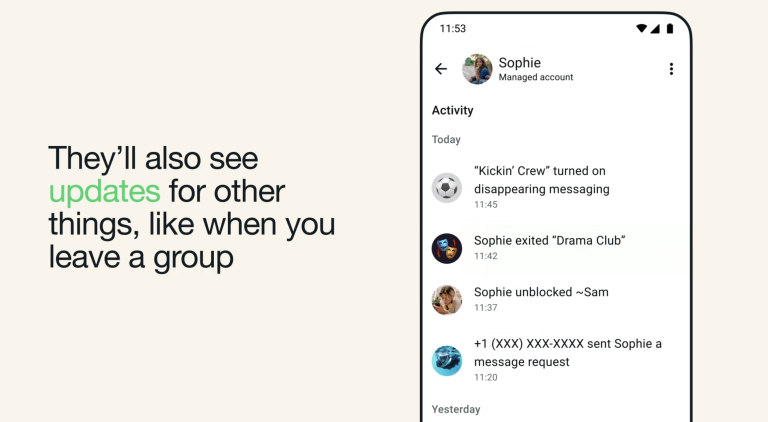
Parents will be notified of new message requests on their phones. They will also be notified of other account activities, such as when their kid adds a new contact or exits a pre-approved group chat.
Pre-teens can find more details about their accounts by visiting their Profile > Learn more. On the same tab, they can scroll down to Parental controls to request changes. Changes to these privacy settings require a six-digit parent PIN set up while creating the account.
How to Set Up Parent-Managed Accounts
WhatsApp says the new parent-managed accounts are rolling out gradually and may take some time to reach all regions. To set up the account for pre-teens, you need to have your phone and theirs side by side.
Begin by downloading WhatsApp on your child’s phone. Agree to the terms and conditions, tap More options, and select Create a parent-managed account. Proceed by entering your child’s phone number and verifying their age. Once done, wait until a QR code is displayed.
Scan the QR code with your phone’s camera to link the two accounts and add a six-digit PIN for parental controls. Finally, enter the PIN on your child’s phone to finish setting up the managed account. For more details regarding the setup process, check out WhatsApp’s support page.
By Mary Mumbua